Home page
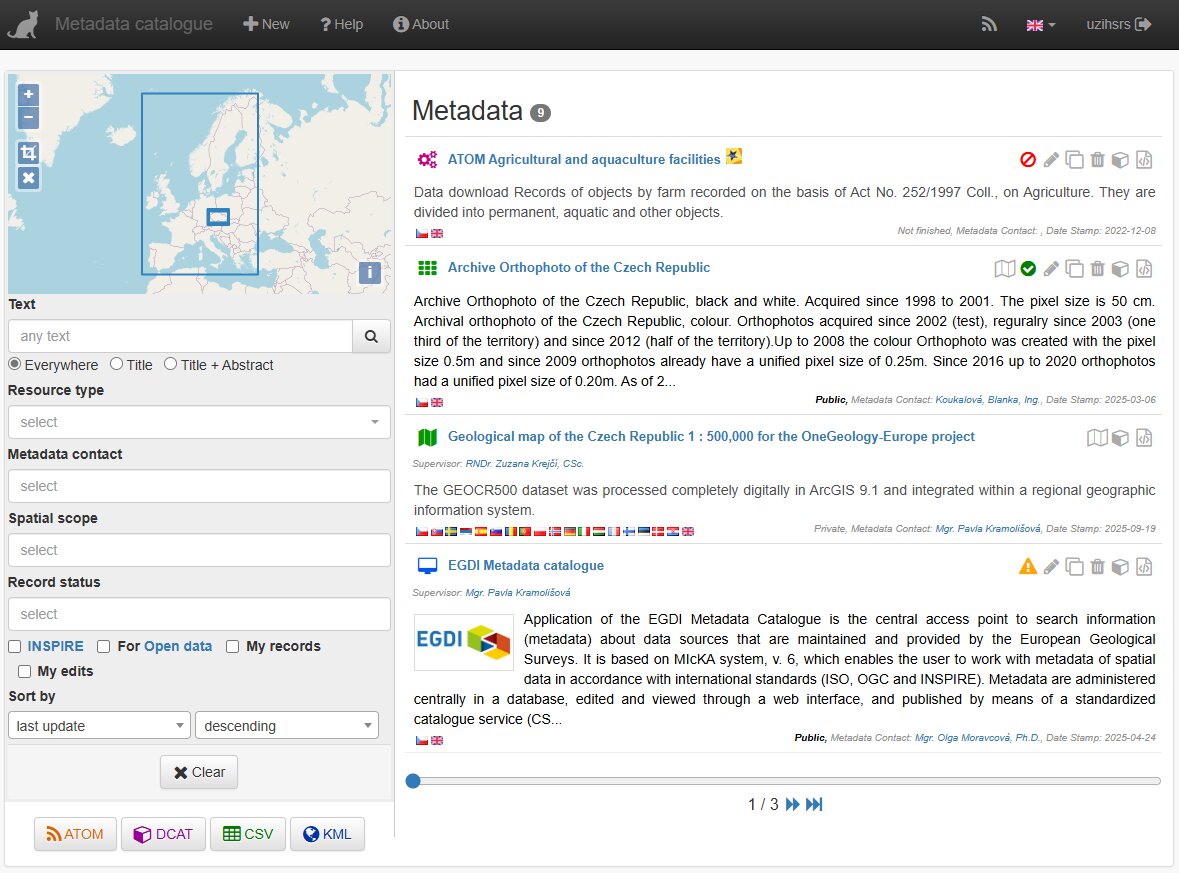
This page contains search form and corresponding list of found metadata records side by side.
Top menu
New - create/import new record (only for logged users)
Settings - all administration tool, profile editing etc.
Help - this help
About - Information about software, version, contact to provider etc…
News - Atom feed providing information about last edited metadata
UI language - switch user interface language (also metadata language for records with corresponding translactions)
User - login/logout and user name
Search form:
Basic search is supported in the application. After setting search criteria in the search form the results are immediately displayed at right panel. Search form is configurable according the provider needs. Other search capabilities are allowed by catalogue service which is integral part of the software. (Connect point is at /csw). Only codelists values contained in the filtered metadata are displayed in the combo boxes. Also number of corresponding records are displayed with the codelist value.
The result is defined as an intersection between all filled search form fields (logical AND). Multiple values in the fields are treated as union between the values (logical OR).
The search form elements set is configurable, so it may differ from installation to installation.
Common elements used:
Spatial extent can be used for search by drawing a rectangle on the map.
- Only inside the extent - If checked, only record with spatial extend fully falling into the selected rectangle. Normally the intersection is treated.
Text: Text search. Possibilities:
- Everywhere / Title / Title + Abstract - scope of the search.
Resource type: Type of the resource
- data - both dataset and non geographical dataset
- service - spatial data service
- application - application/software metadata (similar to services, not in INSPIRE)
- feature catalogue (ISO 19110 feature catalogue)
INSPIRE Theme: INSPIRE keywords.
Contact: Identification info contact - organization or person (according to configuration).
Metadata Contact: Metadata contact - organization or person (according to configuration).
Scale: Scale of the resource (only for resource type = data).
Spatial scope: Spatial scope of the metadata according to INSPIRE.
- Local
- Regional
- National
For authorized users the extended search form is displayed. The search criteria come from mandatory CSW queryables, INSPIRE and user needs.
Check boxes in the bottom part of the search form
- INSPIRE - data marked to be harvested to the EU INSPIRE geoportal
- EGDI - data market to be harvested ot the EGDI Metadata Catalogue
- My records - records I created
- My edits - records that I can edit
Buttons at the bottom of the search form
 Atom feed of the selected records
 DCAT - RDF/turtle output of the selected records
 CSV - csv output (e.g. for Excel) of the selected records
 KML - Keyhole markup file (Google Earth) of the selected records
Result records set:
The header of each record contains set of icons
Metadata type icons in the title:
 Dataset
 Non geographic dataset
 Series
 Application
 Feature catalog (ISO 19110)
 Spatial services metadata (ISO 19119)
 Dublin Core metadata (ISO 15836)
=== These icons should be displayed at the end of the title: ===
*  Inspire
*
Inspire
*  Opendata (NKOD - National open data catalog of the Czech Republic)
—
Opendata (NKOD - National open data catalog of the Czech Republic)
—
Right side icons (and functions):
 Display web service, if available, in the connected viewer
 Data validity – displays the cached result of record validation (valid / invalid / warning), clicking on the icon opens and runs the validator,
 Editing records – opening the editing form,
 Duplicate record – copy the record with a new identifier and open it for editing,
 Deleting a record,
 Display in format Geo-DCAT RDF,
 Display in format XML (ISO 19139).
Below the entry are flags representing the languages used, the status of the entry (in progress / private / public), contact details, and the date of the last update.
Clicking on the name of the dataset displays a basic metadata view, which can be switched to a full view.
Paging
if the number of records exceeds the page limit, the paginator is displayed on the bottom of the page. Default limit is 10 and may be configured.